- 新春6折: Odoo19全面升级已完成,微信小程序支付全场6折。
- 即时下载:购买后从我的 应用中心下载
- 服务支持:购买后15天内邮件 安装指导
- 授权许可:购买即代表同意 用户协议
- 售后承诺: odooApp.cn 的模块与主题均保证功能与您下载时所见描述一致,如有异议可在下单后15天内申请免费退款
- 更多支持:务必参考 FAQ常见问题与答疑

App account superbar navigator
Browse journal by account chart... Use for parent children tree list kanban navigator.
ztree widget.Hierarchy Tree.Parent Children relation tree..

会计科目树状导航 / Account Superbar Navigator
按科目表父子结构浏览会计数据 / Browse Accounting Data by Account Chart Tree
为会计科目、辅助核算、日记账、凭证行提供树状导航,支持列表、看板、透视表、图表视图
Tree navigator for Account, Analytic, Journal, Journal Items with list/kanban/pivot/graph views
功能概述 / Overview
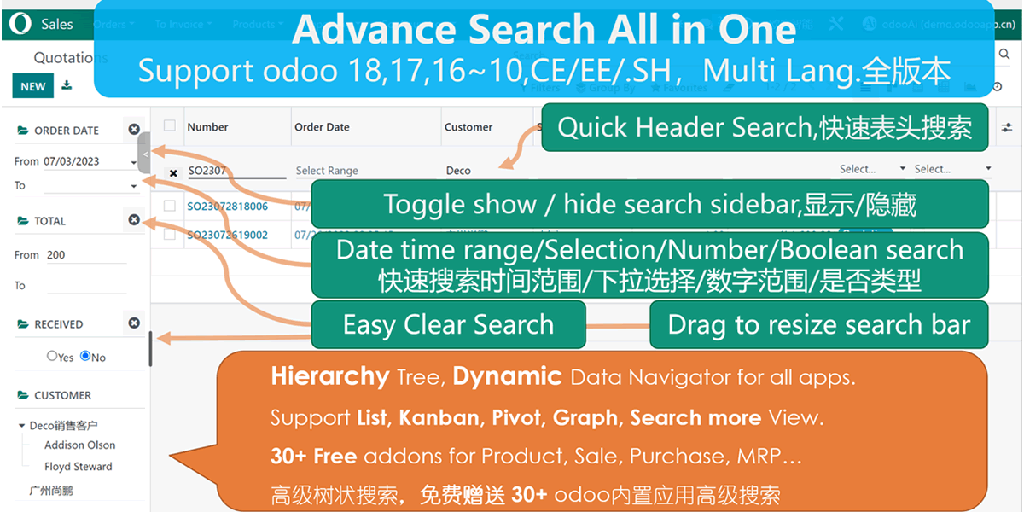
本模块为 Odoo 会计模块提供树状导航(Superbar)。按会计科目表、辅助核算科目的父子层级结构浏览日记账、凭证、凭证行、辅助核算明细。支持列表、看板、透视表、图表多种视图,Ctrl/Cmd多选节点,勾选控制是否包含子节点数据。
This module provides tree navigator (Superbar) for Odoo Accounting. Browse journals, entries, items and analytic lines by account chart hierarchy. Supports list/kanban/pivot/graph views, Ctrl/Cmd multi-select, and child node inclusion control.
核心亮点 / Key Highlights
树状导航让会计数据浏览更直观 / Tree Navigation for Intuitive Accounting Data Browse
1. 科目树状导航 / Account Chart Tree
Parent-Children Hierarchy
按会计科目父子层级浏览日记账和凭证
2. 多视图支持 / Multi-View Support
List/Kanban/Pivot/Graph
树形、列表、看板、透视表、图表视图均可使用
3. 多选与子节点控制 / Multi-Select & Child Control
Ctrl/Cmd Multi-Select
Ctrl/Cmd多选节点,勾选控制是否包含子节点
通用特性 / General Features
多语言与多公司
Multi-Language & Multi-Company
完整的多语言翻译支持,适配全球化企业部署。原生多公司架构,数据严格隔离。
全版本兼容
Full Version Support
支持 Odoo 19, 18, 17, 16, 15, 14, 13, 12,EE/CE/.SH,兼容企业版、社区版及在线 SaaS。
代码完全开源
Full Open Source
基于 LGPL-3 协议开源,代码透明可审计,支持二次开发与定制。
界面截图 / Screenshots
核心功能界面一览
Use in Account / 在会计模块中使用

Product by Category or Type in Kanban View / 产品按分类看板视图

Free to Use in Product Category / 产品分类中使用

Free to Use in POS / 在POS销售点中使用

POS Product and Order / POS产品与订单

POS Report / POS报表

Use in Sale / 在销售模块中使用

Use in Purchase / 在采购模块中使用

Use in Contacts / 在联系人模块中使用

Show Superbar in List View / 列表视图中的Superbar

Show Superbar in Kanban View / 看板视图中的Superbar

Show Superbar in Pivot View / 透视表中的Superbar

Show Superbar in Graph View / 图表视图中的Superbar

Click Switch to Show or Hide Superbar / 点击切换显示/隐藏Superbar

Click Checkbox to Set Child Nodes / 勾选控制子节点数据

Press Ctrl/Cmd to Select Multi Nodes / Ctrl/Cmd多选节点

Set Multi Field to Search or Filter / 多字段搜索与过滤

Customize Widget Configuration / 自定义Widget配置

免费关联模块 / Free Related Apps
安装本模块后,以下关联模块可免费下载使用
使用流程 / How It Works
安装模块
Install Module
展开树状
Expand Tree Nodes
多选过滤
Multi-Select & Filter
浏览数据
Browse Filtered Data
支持与依赖模块 / Supported & Dependent Modules
- account / 会计
odooai.cn
专业Odoo服务伙伴-开发实施咨询培训全套解决方案 / Professional Odoo Solutions

Specifications
| 版本 | 19.0, 18.0, 17.0, 16.0, 15.0, 14.0, 13.0, 12.0, 11.0, 10.0 |